Right now, you're probably deep in the daily work of writing practice — tracing hiragana, katakana, and kanji one character at a time. That's exactly the work that needs to happen at this stage. It's also the stage where real Japanese still feels a long way off: turn on a Japanese video and most of it washes past before you can catch a single word. That gap is completely normal.
Here's a suggestion that helps a lot of learners at this exact point: while you're practicing characters, start exposing yourself to real Japanese in small, enjoyable doses. Not to "study" it hard — just to let your ear get used to how the language actually sounds, and to start collecting the odd word you heard somewhere real. The tool we recommend for this is LangClip — designed to make learning Japanese from real videos both more efficient and more enjoyable, even before you can read kanji.
What LangClip does
LangClip is a browser extension paired with a web app. It has four features that matter most at the N5–N4 stage:
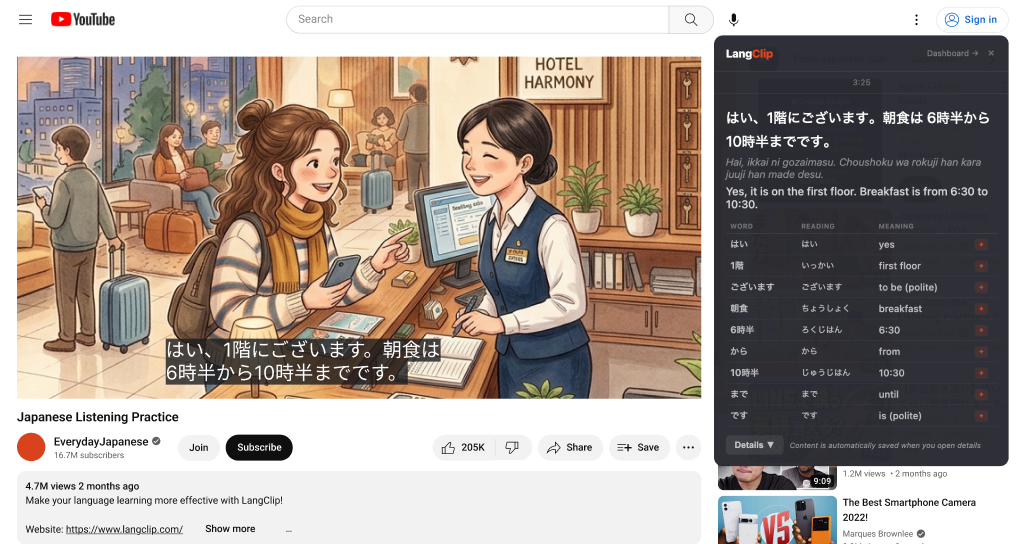
- Instant subtitle help. Pause any Japanese YouTube video and LangClip shows a translation and a word-by-word breakdown with furigana — no dictionary detours, so you can keep watching.
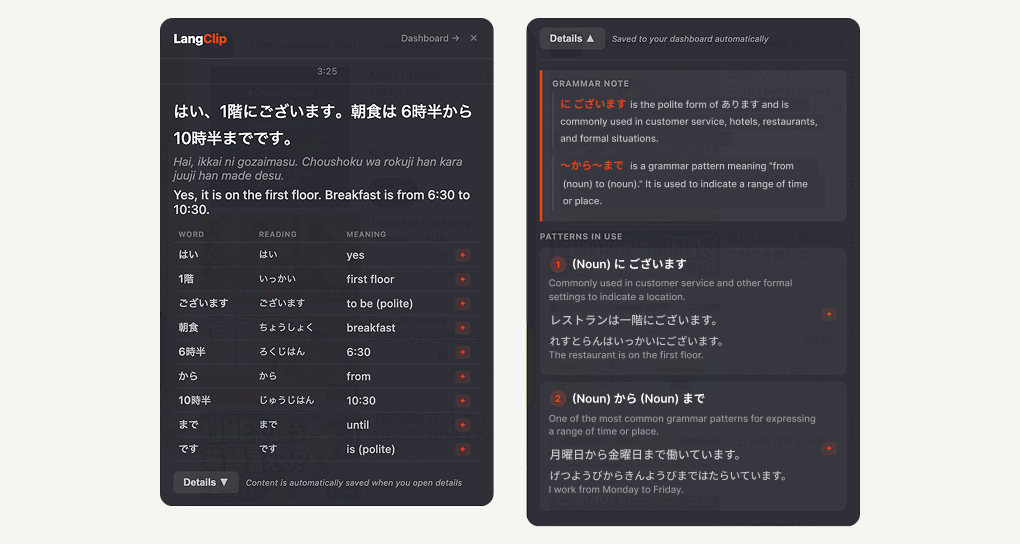
- Grammar notes & patterns in use. Tap "Details" and LangClip explains the grammar pattern behind the sentence, with example sentences — helpful when a grammar pattern is new to you.
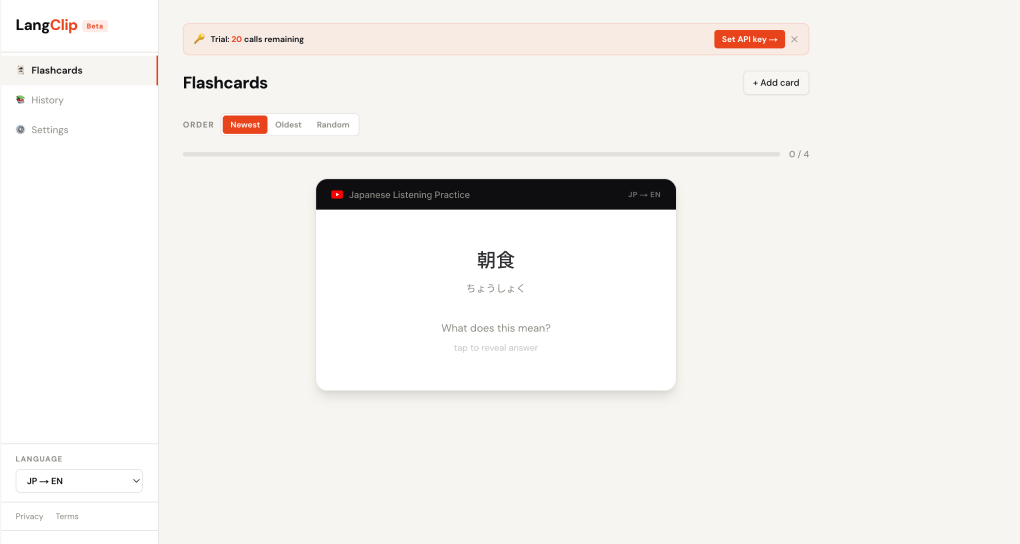
- One-click flashcards. Anything you find useful — a word or a whole example sentence from the detailed view — drops into your flashcard deck with one tap.
- Subtitle cleanup. YouTube's auto-captions often mishear Japanese; LangClip attempts to correct them before explaining, so you're less likely to learn from broken input.
Here's each one in a little more detail.
Instant subtitle help
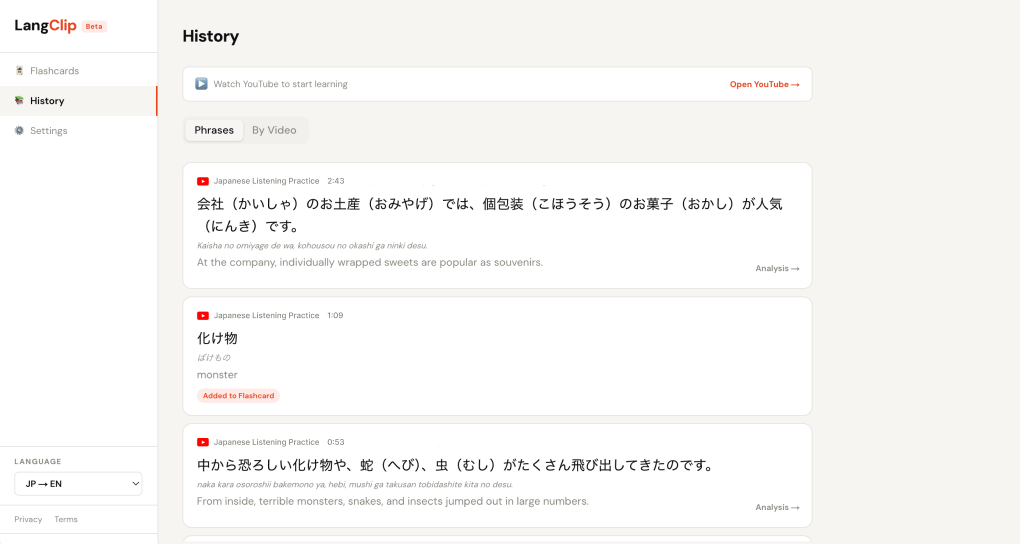
Turn on Japanese subtitles on any YouTube video, and whenever a phrase throws you off, pause. An overlay appears with an instant translation and a word-by-word breakdown, including furigana and romaji so you can read along even before you know much kanji. Every phrase you pause on is quietly saved to your history — no extra step required.
Grammar notes & patterns in use
Beyond the surface translation, tap "Details" on any phrase and LangClip walks you through the grammar pattern being used, with example sentences showing the same structure in different contexts. This is where a lot of the real learning happens: you stop just recognizing words and start seeing how Japanese sentences are put together. Any example sentence in the detailed view can be added to your flashcards with a single tap — a fast way to collect natural, in-context phrases as your grammar grows.
One-click flashcards
Vocabulary is where the real progress happens, and LangClip gives you two ways to grow your deck without breaking your flow.
- One-click add. When the overlay is showing a word, hit the + button and it drops straight into your flashcards. No copy-paste, no forms — you keep watching. You can also save whole example sentences from the detailed view, not just individual words — great for phrases you want to remember in context.
- Manual add. Heard a word on the street, in a song, or in a textbook? Open the dashboard and type it in yourself. Definition, example sentence, and notes are all editable.
Not sure you want to flashcard a word yet? Every phrase you paused on stays in your history so you can revisit it later without having decided in the moment.
Subtitle cleanup
YouTube's auto-generated Japanese subtitles often mishear homophones or garble kanji. LangClip attempts to correct the subtitle text before explaining it, so you're less likely to learn from broken input.
Why it works for beginners
A few reasons LangClip fits well at the N5–N4 stage:
- Everything stays in context. You learn words attached to a real sentence, spoken by a real person, in a real situation — which is far more memorable than an isolated flashcard.
- Very low friction. No dictionary lookups, no switching apps. Pause, read, resume. That means you'll actually keep watching instead of giving up.
- Real Japanese, not textbook Japanese. You'll pick up natural filler words, casual contractions, and the rhythm of everyday speech that textbooks tend to skip.
- Built-in spaced repetition. The words you save become flashcards, so passive watching turns into active vocabulary.
For video choices, start with slow, clearly-spoken channels — calm vlogs, cooking videos, or short daily-conversation clips. If you're not sure where to begin, take a look at our curated list of YouTube channels for N5–N4 learners and pick one that catches your interest.
Why we recommend it
Learning a language is a long road, and the tools that keep you going every day are worth trying. You've already made it further than most people who start — every hiragana row you've drilled here is proof of that.
We recommend LangClip because it does the two things that matter most at this stage: it makes learning Japanese from real videos more efficient (less time lost to dictionary lookups, fewer stalls) and more enjoyable (you're watching things you actually like, not drilling textbook sentences). Give it a try alongside your character practice here, and see if the workflow clicks for you. Check out the details on the LangClip website.
Turn the YouTube video into a Japanese lesson — instant translations, word-by-word breakdowns, and one-click flashcards.
Try LangClip on YouTube